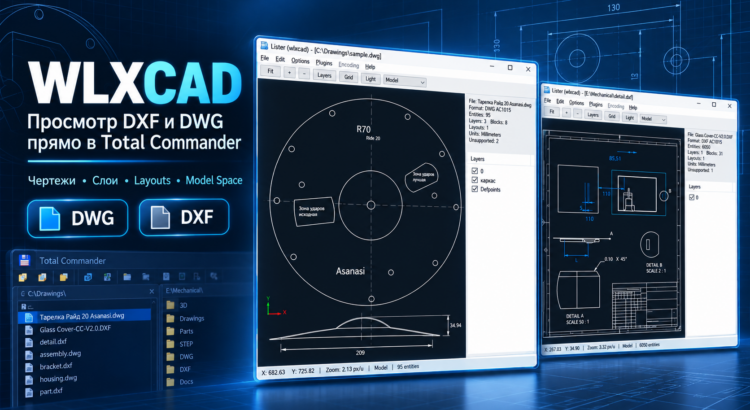
WLXCAD is a free Lister plugin for Total Commander that allows you to open and view DWG and DXF drawings directly in the built-in Lister viewer (F3) or the Quick View panel (Ctrl+Q).
With WLXCAD, you no longer need to launch AutoCAD, nanoCAD, BricsCAD, or other resource-intensive CAD applications just to preview a drawing. Simply select a DWG or DXF file in Total Commander and press F3 — the plugin will load and display the drawing.
WLXCAD is especially useful for engineers, architects, designers, construction professionals, and anyone who regularly works with technical documentation, floor plans, architectural drawings, and CAD projects.
WLXCAD Features
The plugin is designed for fast and convenient viewing of 2D CAD drawings and offers the following features:
- DWG and DXF support — preview popular AutoCAD drawing formats.
- Zoom and Pan — zoom in and out using the mouse wheel and navigate around large drawings.
- Zoom Extents — automatically fit the entire drawing into the viewer window.
- Layer Management — display the list of CAD layers and toggle their visibility.
- CAD Geometry Rendering — display lines, polylines, circles, arcs, ellipses, and other drawing primitives.
- BLOCK and INSERT Support — render CAD blocks, including nested block references.
- Text Rendering — display TEXT and MTEXT entities.
- Colors and Line Types — visualize basic CAD entity properties.
- Drawing Information — view entity counts, layers, blocks, and other document details.
- Quick View (Ctrl+Q) — instantly preview CAD drawings while browsing files in Total Commander.
The viewer features a familiar dark CAD background, smooth navigation, and a convenient layer panel for controlling drawing visibility.
Technical Details
WLXCAD is developed in C++17 using the Win32 API and Microsoft’s Direct2D / DirectWrite graphics technologies.
The plugin is implemented as a standard WLX Lister Plugin and runs directly inside the Total Commander process.
DXF files are processed using a custom DXF parser, while DWG support is implemented through the open-source GNU LibreDWG library.
The project provides:
- Windows x64 and x86 builds.
- Integration with Total Commander Lister (F3).
- Support for Quick View mode (Ctrl+Q).
- Unicode file path handling.
- Direct2D-based 2D rendering.
- CMake build configuration.
- Automated build and release packaging using PowerShell.
WLXCAD is a read-only CAD viewer. Editing, modifying, or saving drawings is not supported.
Some advanced DWG entities, specialized AutoCAD objects, and complex drawing features may have limited rendering support depending on the capabilities of LibreDWG and the current plugin implementation.
Download WLXCAD for Total Commander
The plugin source code, build instructions, and release packages are available on GitFlic:
https://gitflic.ru/project/tarkus-gsa/wlxcad
WLXCAD is a lightweight and convenient DWG/DXF viewer for Total Commander, designed for users who need to quickly inspect CAD drawings, examine layers, check geometry, and browse technical documentation without launching a full CAD application.
Whether you are working with architectural plans, engineering drawings, mechanical designs, or construction documentation, WLXCAD makes browsing DWG and DXF files in Total Commander faster and more convenient.

