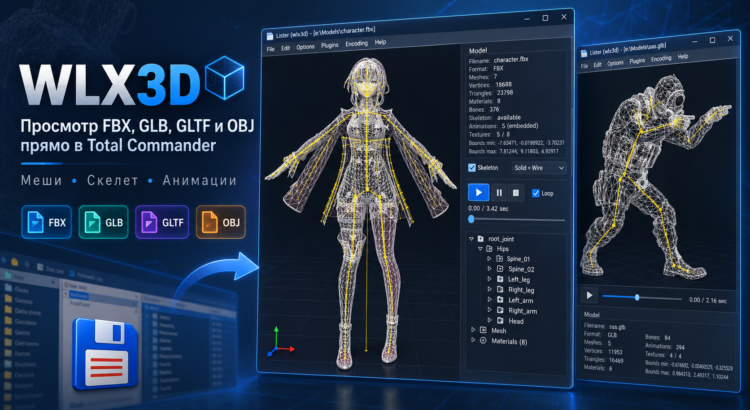
WLX3D is a free WLX plugin for Total Commander that allows you to open and preview 3D models directly in the built-in Lister with F3 or in Quick View mode.
The plugin is designed for fast inspection of game-ready 3D assets without launching Blender, 3ds Max, Maya, or a separate 3D viewer. Simply select a model file in Total Commander and immediately inspect its geometry, materials, textures, skeleton, and available animations.
Supported 3D formats include:
- FBX
- GLB
- GLTF
- OBJ
WLX3D is especially useful when working with large collections of game models and assets for Godot, Unity, Unreal Engine, Blender, modding, and game development.
WLX3D Features
The built-in 3D viewer renders the model directly inside the Total Commander window. It supports Solid, Wireframe, and combined rendering modes.
For rigged models, the plugin detects the skeleton and displays the bone hierarchy. For animated FBX, GLB, and GLTF files, it shows the available animation clips and provides controls for playback, stopping, looping, and timeline scrubbing.
The camera supports familiar mouse controls: orbit around the object, zoom, pan, and automatic framing of the entire model.
The plugin also displays technical information about the model, including the number of meshes, vertices, triangles, materials, bones, animations, textures, and the model bounding box.
GLB files can use embedded textures, while GLTF models can load related .bin, .png, .jpg, and other external resources from the model directory.
FBX / GLB Skeleton and Animation Viewer
One of the main features of WLX3D is that it can display more than just static geometry.
If the model contains a rig, the plugin builds a hierarchical bone tree. This makes it possible to quickly inspect the structure of a character rig, including the spine, arms, legs, fingers, hair, clothing, and auxiliary bones.
Skeletal animation and GPU skinning are supported. For models containing multiple animation clips, you can switch between Idle, Walk, Run, Attack, and other animations directly from the Lister window.
This effectively turns Total Commander into a fast FBX Viewer, GLB Viewer, GLTF Viewer, and OBJ Viewer.
Technical Details
WLX3D is written in C++ and is implemented as a native WLX Lister Plugin for Total Commander.
Rendering is based on Direct3D 11, model importing is handled by Assimp, and the user interface is built with the native Win32 API.
The plugin does not use Electron, Chromium, Unity, Unreal Engine, or a separate external application. The 3D viewer runs directly inside the Total Commander process.
Both 64-bit and 32-bit versions of Total Commander are supported.
The source code is open, and the plugin can be built manually using CMake + Visual Studio 2022.
Download WLX3D
The source code, latest plugin releases, ready-to-use builds, and installation instructions are available on the project page:
WLX3D — FBX / GLB / GLTF / OBJ Viewer for Total Commander
To install the plugin, download the latest release and install it as a standard Total Commander WLX plugin.

